Transform Your Photos: A Guide to the Vector Acid Color Photoshop Action
In the fast-paced world of digital content, simply having a good photograph isn't always enough. We are constantly scrolling through feeds saturated with high-quality imagery, and to stand out, your visuals need a distinct personality. This is where the Vector Acid Color Photoshop Action comes into play. It isn't just another filter; it is a design asset engineered to bridge the gap between standard photography and the bold, punchy world of vector art and pop art. For photographers, designers, and content creators, this action serves as a shortcut to achieving a complex, stylized look that typically requires hours of manual editing.
The Visual Identity: More Than Just a Filter
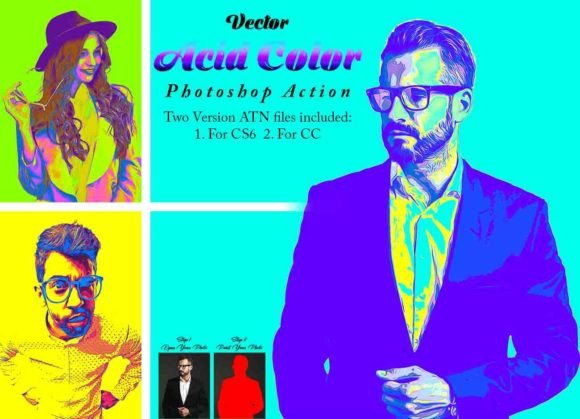
So, what exactly does the Vector Acid Color Photoshop Action do to an image? Visually, it strips away the photorealism of a standard shot and replaces it with high-contrast, saturated "acid" colors and sharp, defined edges. Think of it as a fusion of modern pop art and vector illustration aesthetics. The result is an image that pops off the screen with neon undertones and stark shadows. It adds a layer of texture and depth that flat editing cannot achieve, creating a unique style that feels both edgy and polished.
The personality of this style is undeniably bold. It is aggressive, youthful, and energetic. This makes it a perfect fit for projects that need to grab attention immediately. Whether you are working on album art, a fashion blog header, or a promotional poster for a nightlife event, the visual impact is immediate. It transforms a standard portrait into something that looks like it belongs on a magazine cover or a streetwear graphic tee.
Practical Application and Workflow Integration
One of the most significant hurdles with premium Photoshop actions is compatibility and ease of use. The developers of the Vector Acid Color Photoshop Action have addressed this by providing two distinct versions of the ATN file: one specifically for CS6 and another for the CC versions (tested up to CC2022). This ensures that whether you are running a legacy system or the latest software update, the action will run smoothly without errors.
However, using this tool effectively requires a specific workflow. It is not a "one-click" miracle if your file isn't prepared correctly. To get the best results, you need to treat the image preparation as part of the creative process:
- Resolution Matters: The action is optimized for high-resolution output. You should resize your image to 3000px x 2000px at 72 DPI before starting. This ensures the effects have enough pixel data to render cleanly without looking pixelated or muddy.
- The "Paint" Layer Technique: Unlike standard actions that run over the whole image blindly, this tool offers a level of customization. You are instructed to create a new layer named "paint" (in lowercase) and brush over the areas you want to affect. This allows you to isolate the effect. For example, you might want the acid color effect only on a subject's clothing or the background, leaving the skin tones natural.
- Non-Destructive Editing: Because the action relies on layers, your original image remains untouched underneath. This is crucial for professional work where you might need to dial back the opacity or mask out certain areas later.
Strategic Use in Branding and Marketing
For small business owners and marketers, visual consistency is the cornerstone of brand identity. Incorporating a tool like the Vector Acid Color Photoshop Action into your marketing toolkit can help define a specific aesthetic. If your brand voice is energetic, disruptive, or youth-focused, this visual style reinforces that message.
Consider the application in social media graphics. Instagram and TikTok algorithms favor content that stops the scroll. A standard product photo might get lost, but a product shot rendered with this acid color effect creates an immediate visual hook. It creates a pattern interrupt that forces the viewer to pause and look closer.
Furthermore, in editorial design or magazine layouts, using this action can help create visual hierarchy. By applying the effect to a hero image, you instantly distinguish it from secondary content. It creates a focal point that guides the reader's eye exactly where you want it.
Evaluating Fit and Professional Polish
While the style is powerful, it is not suitable for every context. A corporate law firm’s headshots or a delicate wedding portfolio probably shouldn't look like they were dipped in acid. This action is best suited for:
- Music and Entertainment: Album covers, event flyers, and DJ promotional materials.
- Fashion and Streetwear: Lookbooks, website banners, and social media stories.
- Personal Branding: Creators who want a distinct, artistic, and edgy profile image.
- Digital Art: Creating backgrounds or abstract elements for other design projects.
When evaluating if this fits your project, consider the readability of the final image. High-contrast acid colors can sometimes make text overlays difficult to read if placed incorrectly. It is often best to use the action on images that will stand alone or be paired with bold, sans-serif typography that can hold its own against the vibrant background.
Conclusion: Elevating Your Creative Assets
The Vector Acid Color Photoshop Action is more than just a novelty; it is a legitimate design asset for creatives looking to expand their visual library. By including 10 color options, a PDF help file, and a video tutorial, the package provides a complete ecosystem for success. It empowers you to take a standard photograph and transform it into a piece of modern digital art. For the designer looking to save time without sacrificing style, or the marketer aiming to create viral-worthy content, this action provides the perfect balance of efficiency and visual impact.